For businesses in 2026, social media remains one of the most powerful ways to reach and engage customers. But true success goes beyond just attention-grabbing visuals and headlines. It’s also about providing clear, easy ways for audiences to take the next step. That’s where links in Facebook posts shine: driving traffic to your website, showcasing products, or offering deeper resources. Links are great at capturing sporadic interests with value-adding content that builds the authority and interest you need to grow your business. We’ve seen evolving changes on the right way to add links on facebook throughout the last 10 years, where shifts in user behavior and technology has led to how links are viewed by Facebook.
In the early 2010s, Facebook posts were a traffic generator for businesses. Brands could post a link and expect massive traffic. However, in Meta’s Widely Viewed Content Report Q3 2025, 97.3% of the most-viewed posts in the US contained no external links. It’s clear how dominant organic content without links is on Facebook. Businesses should definitely be aware of the impact links has on their social media reach.
Links in Standard Posts
When creating a post to celebrate your business’s new win or to reinforce your business benefits, you have two main choices to include links. You can either practice Link in Caption (pasting a URL to generate a card) or Link in Comments (posting a native image and dropping the URL below).
Link in Caption
Links in captions are the visual “cards” that replace raw URLs in Meta posts, displaying a thumbnail, headline, and description. They act as mini-ads that provide instant context, making your shared content look professional and trustworthy.
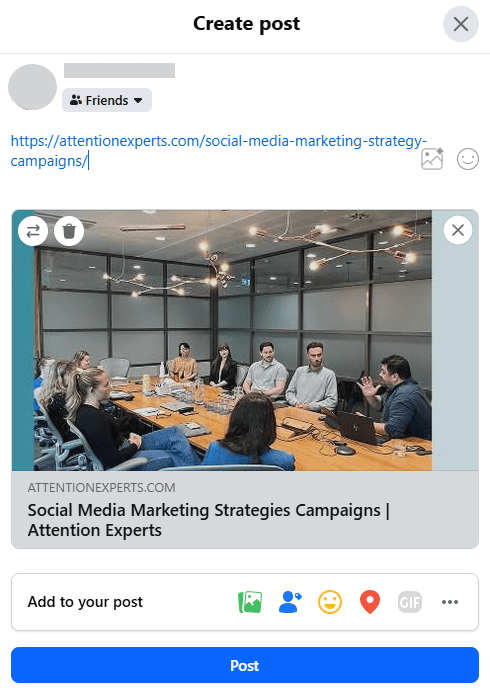
These links show previews that rely on the Open Graph protocol. When you paste a link, Meta’s crawler scans your site’s HTML for specific meta tags to pull the image and text. If these tags are missing or broken, the preview will fail, which is why proper metadata setup is crucial for visibility.
Links in captions provide a pretty good user experience, as it’s easy for the user to see, but remember what Meta prefers? It’s about “Keeping users on the platform”. Therefore, links in post captions would usually experience organic reach drops. Placing the link in comments is often the better choice, yielding higher reach via the content being native to the platform, which we at Attention Experts strongly recommend.
Link in Comments
This method emerged as a smart trick created by marketers to outsmart the 2018 algorithm changes. But as it became clear that posts containing outbound links were being heavily impacted in reach, this tactic has moved from a niche trick to a mainstream professional standard, and is now frequently being recommended by Meta’s own internal Business Suite prompts for maximising reach.
To add links in your comments, you create a post with a high-engagement image or video but leave the caption free of any external URLs, except the text “link in comments” and the end of the post. Immediately after hitting “Publish,” you drop the link as the first comment on your own post.
Link in comments is the better practice for links in organic posts.
Links in Facebook Stories
Remember the famous “Swipe-Up” feature? A gated link option behind a 10,000 minimum follower count, Facebook finally introduced the Link Sticker option in 2021, where everyone could add a link for a call to action, allowing small businesses to further engage their beloved followers. High interaction with a Link Sticker is viewed as a “Positive Signal,” telling the algorithm that your most loyal fans find your content valuable, so contrary to links in posts, Meta does not penalise Stories for containing links.
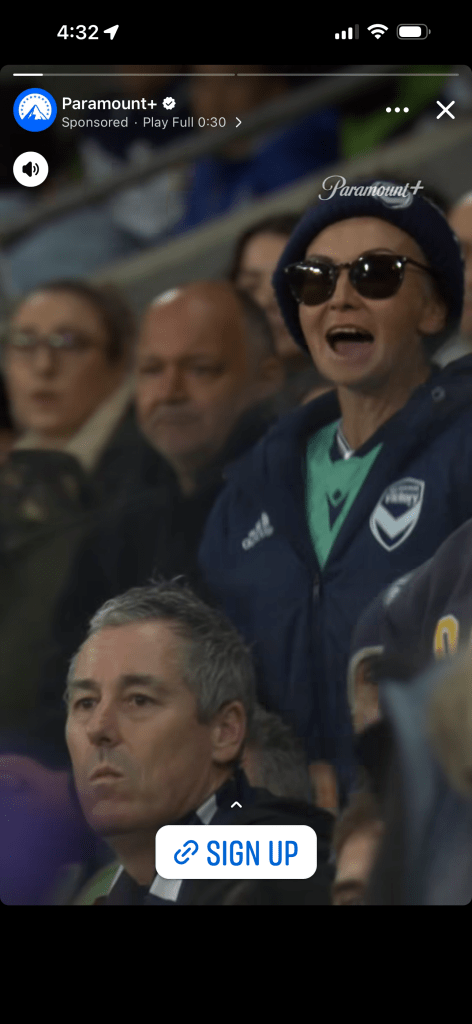
Within the Story editor, the Link Sticker allows you to embed a clickable URL directly onto your visual content. Unlike static posts, these stickers can be customised with specific CTA text (e.g., “Get the Discount” or “Read Full Story”) to better align with your brand’s voice.
Pro-tip:
Use Stories for “Middle-of-Funnel” content: limited-time offers, flash sales, or sharing a new blog post to your core audience.
The “Comment for Link” Method
As the platform became more crowded, Facebook began prioritising posts that get a lot of engagement. This led to the birth of “automated delivery”: a way for businesses to give people exactly what they want, right in their inbox, without making them go hunting for it, while satisfying the algorithm’s engagement metrics to further your exposure. In many scenarios, this is a must-try for exponential fresh audience reach!
To set up this system, you’ll first choose a specific trigger word: a simple, relevant keyword like GUIDE, or ACCESS, or LINK, and invite your audience to type it in the comments.
Behind the scenes, you connect your Facebook page to a Meta-approved automation tool (such as ManyChat), which monitors your post for that specific word. Once a user comments, the tool instantly “hand-delivers” a private message to their inbox containing the link they requested.
To keep the interaction feeling natural and compliant with Facebook’s rules, you can set the system to randomly rotate between a few different public replies like “Sent, please check your DM!” or “Sent :)”, which confirms to the user that their request was successful while signalling positive, authentic engagement to the algorithm and other users.
A Good Website Matters!
Links play a significant role in the Facebook experience. The platform closely monitors where you direct your followers. When you share quality links that lead to useful content, it won’t harm your reach. However, if your website is slow, difficult to use, or appears untrustworthy with things like scams or phishing traps, Facebook will limit the visibility of your posts. To maintain a strong reach, ensure that your landing page loads quickly, is easy to navigate on a phone, and delivers the value you promised.
Summary
In 2026, the way you handle links on Facebook directly determines how many people will actually see your content. The Meta algorithm is now designed to prioritise posts that keep users on the platform; if a post is built solely to send people elsewhere, Facebook will limit its reach.
To maintain high visibility while still driving traffic, you need to change how you share destinations. Instead of including a link in the main body of a post, successful strategies now rely on more subtle methods:
Link in the First Comment
Placing links in the comments section allows the main post to be categorised as “native” content, which the algorithm is more likely to promote.
Story Stickers
Using links within Stories targets your most active followers without affecting the reach of your primary feed.
Direct Messaging
Prompting users to ask for a link via DMs transforms a public broadcast into a private, high-value interaction that the platform views as a positive engagement signal.
Doing this correctly ensures your content stays out there to value-add, to intrigue, or to educate. If you have questions about navigating these changes or want to optimise your current strategy, feel free to get in touch with our attention experts.